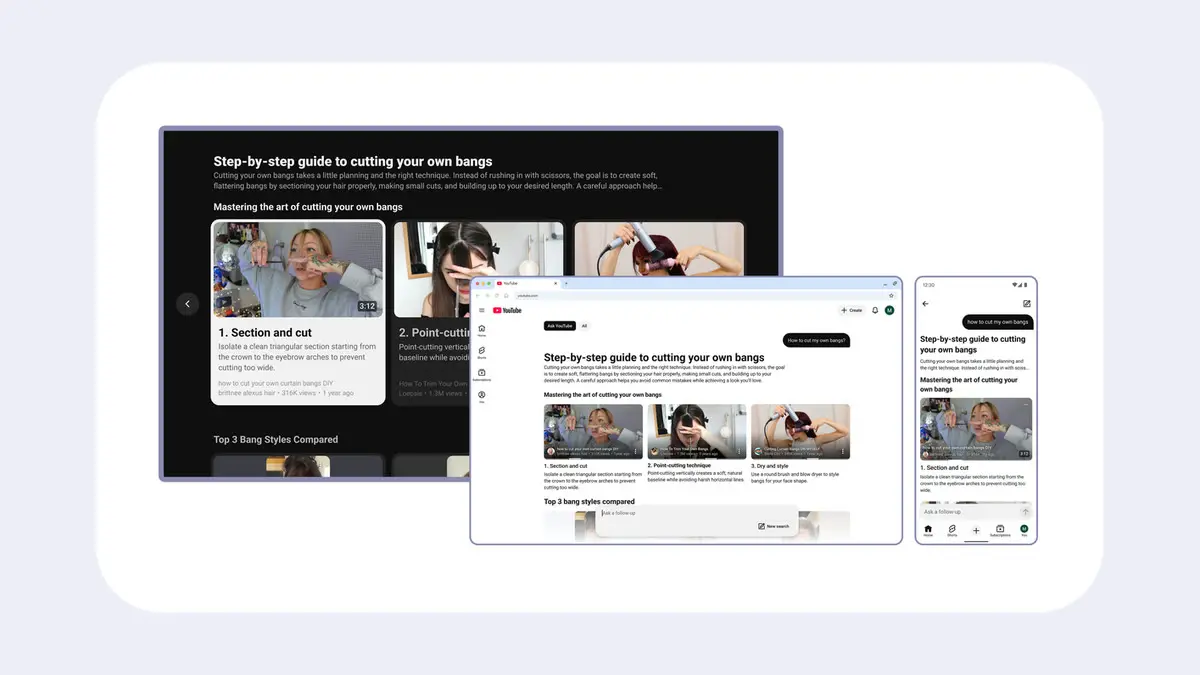
YouTube's Ask search is rolling out on phones in the US, CEO Neal Mohan said on Oct. 12. Ask YouTube is a conversational search: you type a full question, get an answer built from videos and text, then ask follow-ups.
It was already on web and TV, so US viewers now have it on all three, except Apple TV devices, where YouTube Help says it is not available.
What changed
- Mobile: Mohan's post says Ask is "now rolling out on mobile in the U.S." YouTube's blog says Ask YouTube is now available to US viewers across web, mobile and TVs. The rollout is gradual, so your app may not show it yet.
- Watch page: YouTube says viewers will soon be able to use Ask YouTube while watching Shorts and live streams. It gave no date.
- Other countries: the blog and Help page name none, and give no date.
Who can use it
- Region and language: YouTube Help says it is available to users in the United States searching in English, on a computer, mobile or TV, with availability gradually expanding.
- Not available: supervised kid accounts and the YouTube Kids app, per YouTube Help, which adds that this may change.
- Premium, age and sign-in: The Help page we read lists no Premium requirement, no minimum age and no sign-in rule, so we cannot say what applies. At launch in May, YouTube's blog said it was for Premium members aged 18 and up in the US.
How to use it
- Phone (Android and iPhone, same steps on YouTube Help): open the YouTube app, tap Search, then tap Ask. Type a question in plain language, such as the roadtrip example in YouTube's Help page.
- Web: click the search bar on youtube.com, click Ask YouTube, type a question, and use the follow-up field at the bottom.
- TV or console: search by voice or keyboard, then select the Ask YouTube button below the results. YouTube Help says voice searches may open Ask YouTube automatically for complex questions, and that it is not available on Apple TV devices.
What answers show
YouTube Help says responses mix long-form videos, Shorts and text, and can include clips with the video title and channel. Videos start at the timestamp most relevant to your question. You can refine with suggestions or follow-up questions. Playlists and Premium-exclusive content are not currently eligible to appear in answers.
Digital Trends, describing earlier testing, says answers also grouped Shorts by topic.
Can you avoid it?
The Help page describes no setting to turn Ask YouTube off, and says nothing about plans for one. You can keep using normal keyword search.
Your Ask conversations are saved to My Activity, where you can review and delete them. YouTube says human reviewers may read conversations, and reviewed ones are kept separately for up to 3 years. It also says your Ask conversations are not being used to show you ads.
Why it matters
Search results that arrive as written answers can send you straight to a clip instead of a list of videos, which could save time. The trade-off is that YouTube's own Help page warns generated answers can be wrong and should not be relied on for medical, legal or financial advice, so check anything important elsewhere.