Google says Gmail Live, voice search for your inbox in the Gmail app, is rolling out to paid Google Workspace users on Android and iOS, starting Oct. 15. The post limits it to US users with EN-US, which differs from 9to5Google's Sept. 3 "English worldwide" consumer report. Google's Oct. 15, 2026 post lists no free Gmail plan.
Who gets it and when
Google's post lists these Workspace plans: Business Starter, Standard and Plus; Enterprise Starter, Standard and Plus; Frontline Plus; and Workspace for Nonprofits. Qualifying add-ons are Gemini Business, Gemini Enterprise, AI Expanded Access and AI Ultra Access, plus Google AI Pro for Education.
For consumers, the same post names Google AI Plus, Pro and Ultra. Rapid Release and Scheduled Release domains get a gradual rollout, taking up to 15 days to become visible, starting Oct. 15. Google's Oct. 15, 2026 post gives no date for other countries or languages.
Consumer subscribers are not waiting on this step. 9to5Google reported on Sept. 3 that Gmail Live was rolling out to AI Plus, Pro and Ultra on Android and iOS, in English worldwide. Google's Sept. 3 post said business customers were "coming soon," which this rollout follows.
How to start it
Per Google's post, tap the Live entry point in the Gmail search bar on a supported iOS or Android device to begin a voice session. First-time users are asked to grant microphone access. The Help Center page says that if you denied the microphone earlier, the session will not start until you allow it.
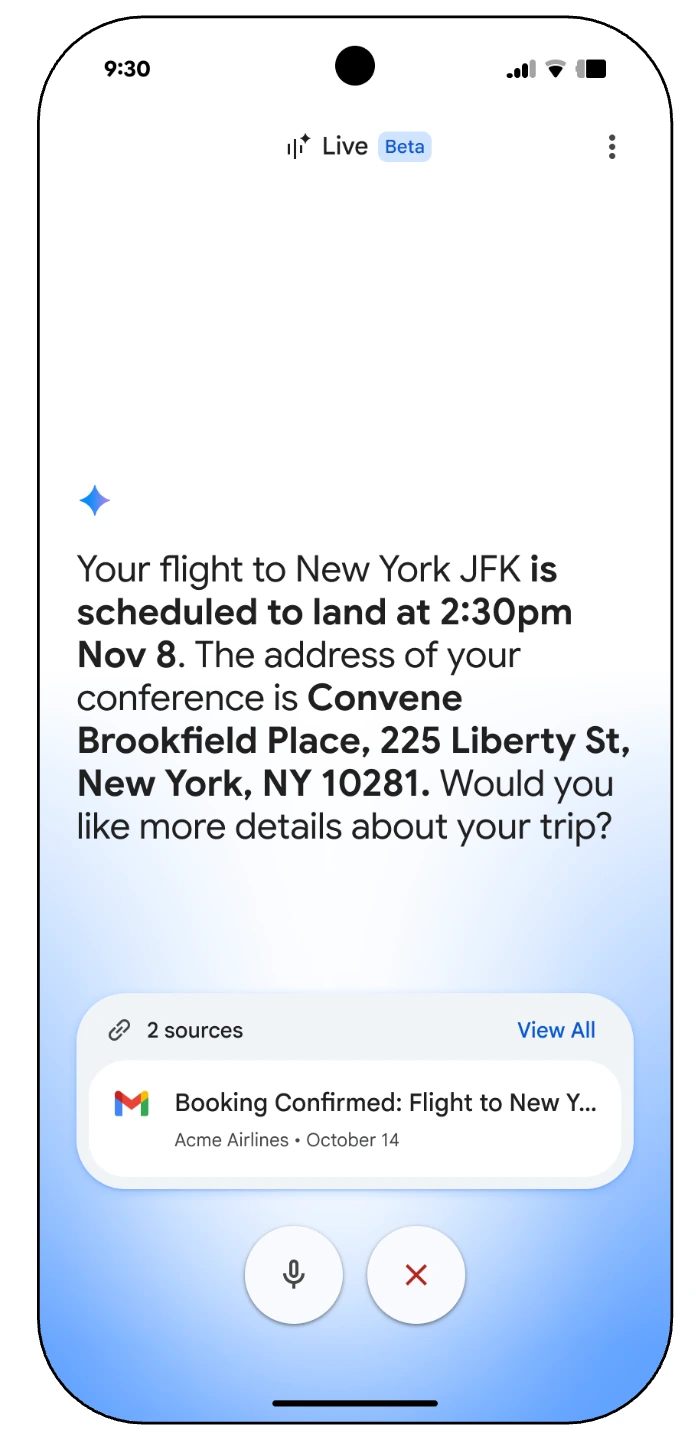
The Help Center page also labels Gmail Live a beta and says it works only in English. Gmail's smart features must be on. Google's post says the feature uses its latest Gemini models.
What it is good for
Google's post gives sample questions: the order status for a named supplier, when your next mandatory training is due, the latest update from your manager, and which gate your flight leaves from tomorrow. You ask out loud and hear an answer drawn from your email, with no scrolling.
The Help Center page says you can interrupt Gmail Live to change topics or ask a follow-up. Per Google's post, an email source card now appears at every turn, and you can pick the voice from inside Gmail Live. The Android Help Center page still lists changing the voice as unavailable, so the two Google pages disagree.
9to5Google described the feature at I/O as very much like Gemini Live but optimized for Gmail.
What it reads, and who controls it
Gmail Live answers from your own email, so the controls matter. Google's post says it is on by default for organizations with Gemini in Workspace access and respects existing smart features and personalization admin settings. It points admins to Google's guide to turning Gemini features on or off.
The Help Center page says users need both smart features settings in Gmail turned on. It says Gmail Live saves transcripts in your Gemini in Workspace conversation history, which you can review and delete from a web browser. For work or school accounts, it says your admin controls access.
The Help Center page also says the Sources card lists every email cited. Opening one of those emails ends your session.
Why it matters
Our assessment: because the feature is on by default and reads the inbox, admins at eligible organizations decide whether staff see the Live button. A team that wants it off should check its Gemini settings during the 15-day window. For users, the source cards are the way to confirm an answer before acting on it.