Windows 11 now has a built-in way to reinstall itself from the internet, with no USB recovery drive. Microsoft's KB5127936 release notes say the new "Cloud rebuild" option downloads a Windows image and your PC's drivers from Windows Update, including when Windows cannot start.
What Cloud rebuild does
- Reinstalls Windows 11 from a Windows image and device drivers downloaded from Windows Update. No USB media or custom image is needed.
- Works on a PC that will not boot. After repeated boot failures, the PC enters the Windows Recovery Environment (WinRE) on its own.
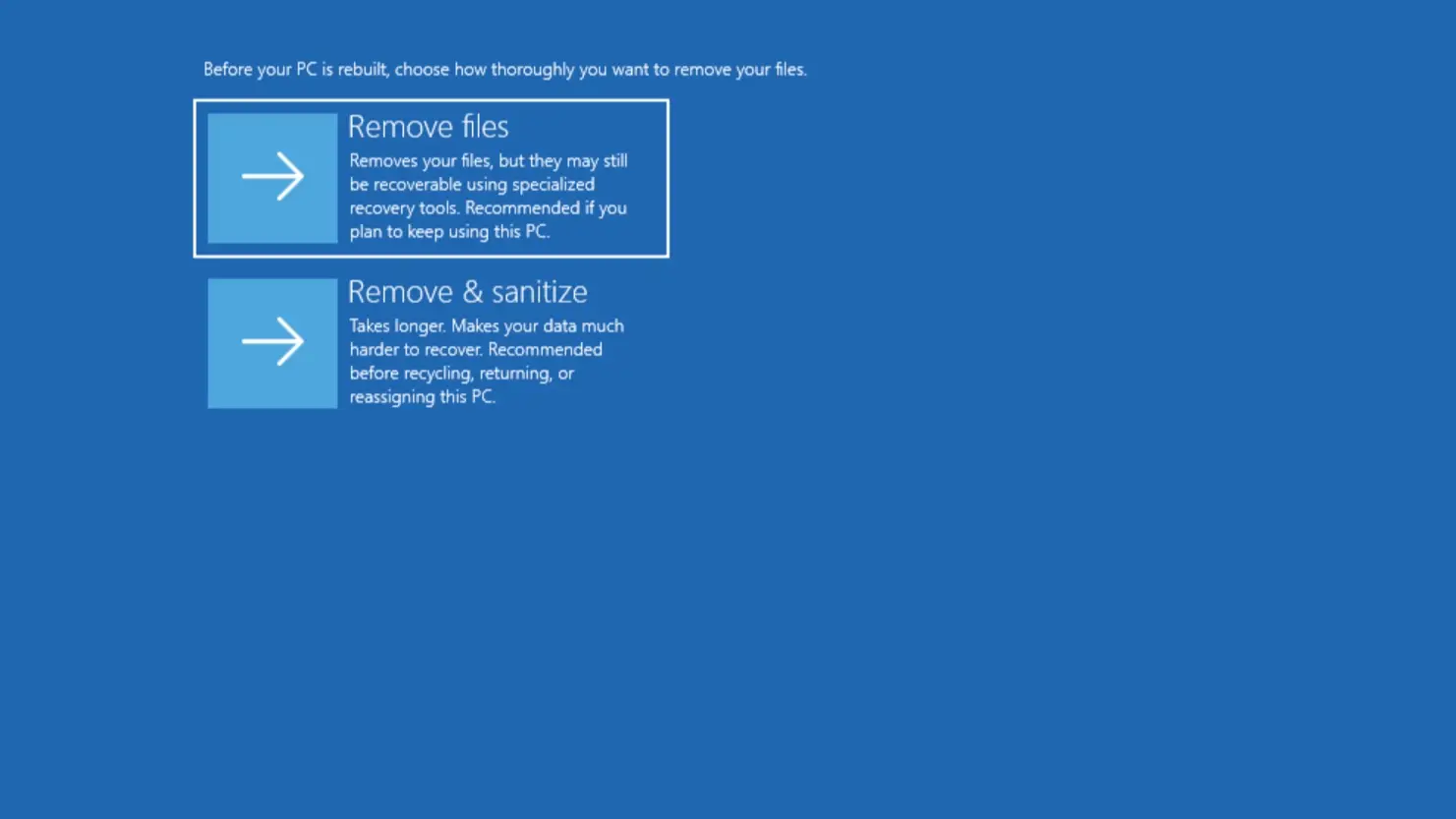
- Offers two erase levels. "Remove files" is faster, but Microsoft's documentation says files might be recoverable with specialized tools. "Remove & sanitize" uses the storage hardware's own erase capability.
- Can be run remotely. IT admins can configure and start it through the Recovery CSP, using the installed build or a specified target build.
What it erases
Microsoft's documentation says Cloud rebuild reformats the system disk and removes all local files, accounts, apps and settings. Data in cloud services such as OneDrive is not affected. Sanitizing is irreversible, so back up anything you want to keep first.
What to do: how to start it
The update is an optional preview, so it is not pushed to everyone. In Windows, open Start > Settings > Windows Update > Advanced options > Optional updates, as the release notes describe. Then:
- Go to Settings > System > Recovery and select Rebuild PC. The PC restarts into WinRE and starts Cloud rebuild.
- If Windows cannot start, wait for WinRE to open after repeated boot failures, then choose Troubleshoot > Recovery and uninstall > Cloud rebuild.
- Connect to wired Ethernet or Wi-Fi. If only Wi-Fi is available, Microsoft's documentation says to select a WPA-Personal network and enter its passkey.
- Review the target Windows build, edition and language, then confirm the data loss warning.
Who is affected, and what is still unknown
The update covers Windows 11 versions 25H2 and 26H2, builds 26300.9818 and 26200.9818, released Oct. 28. Microsoft says it is in a "gradual rollout," so availability varies by device. The notes do not say when it reaches every PC.
Microsoft's documentation lists prerequisites: a healthy WinRE, a PC maker's network driver in WinRE, and a PC that meets Windows 11's minimum hardware requirements. The notes add that WinRE can now reuse eligible Wi-Fi profiles already saved in Windows, on by default, so a PC may get online without you typing credentials. It also says sanitizing needs the October 2026 non-security update or later, and depends on the drive supporting the erase.
The same update lists one known issue: some USB Audio Class 1.0 devices may show error Code 10 or produce no sound. Microsoft says it is working on a fix. It also adds a faster, customizable File Explorer right-click menu (the Customize menu) and a dark-mode AutoPlay dialog.
Why it matters
Our read: this fixes the awkward moment when a PC will not boot and you have no second computer to make a recovery USB. The trade-off is that it is a full wipe, not a repair. If the PC still has files you need, copy them off or use a repair option first.
It also needs a working network connection inside WinRE, which depends on your PC maker's driver. Microsoft's documentation warns that interrupting a rebuild can leave Windows unable to boot, so keep the PC plugged in. For other recent Windows changes, see Microsoft's Windows 11 memory work for 8GB PCs and the OneDrive storage change.