To stop spam calls on iPhone, open Settings > Apps > Phone and turn on Call Screening (or Silence) and the Spam filter, then add a carrier filter and register at DoNotCall.gov. This guide covers each control, from Apple's and the carriers' own pages.
Quick answer
- Settings > Apps > Phone: choose Ask Reason for Calling or Silence, and turn on Unknown Callers and Spam.
- Settings > Apps > Phone > Call Blocking & Identification: turn on call identification.
- Block a number from its contact card in the Phone app.
- Turn on your carrier's filter.
- Register at DoNotCall.gov and report calls to the FTC.
Jump to: Call Screening and Silence · Filter spam · Live Voicemail · Call identification · Block a number · Carrier filters · FTC
Which iOS version this applies to
Apple publishes the same Screen and block calls guide for iOS 27 and iOS 26. Both list Call Screening, Call Blocking & Identification and the Unknown Callers and Spam filters under Settings > Apps > Phone.
Apple's iOS 26 announcement says Call Screening builds on Live Voicemail. Menu paths below follow Apple's iOS 27 guide.
Screen or silence unknown callers
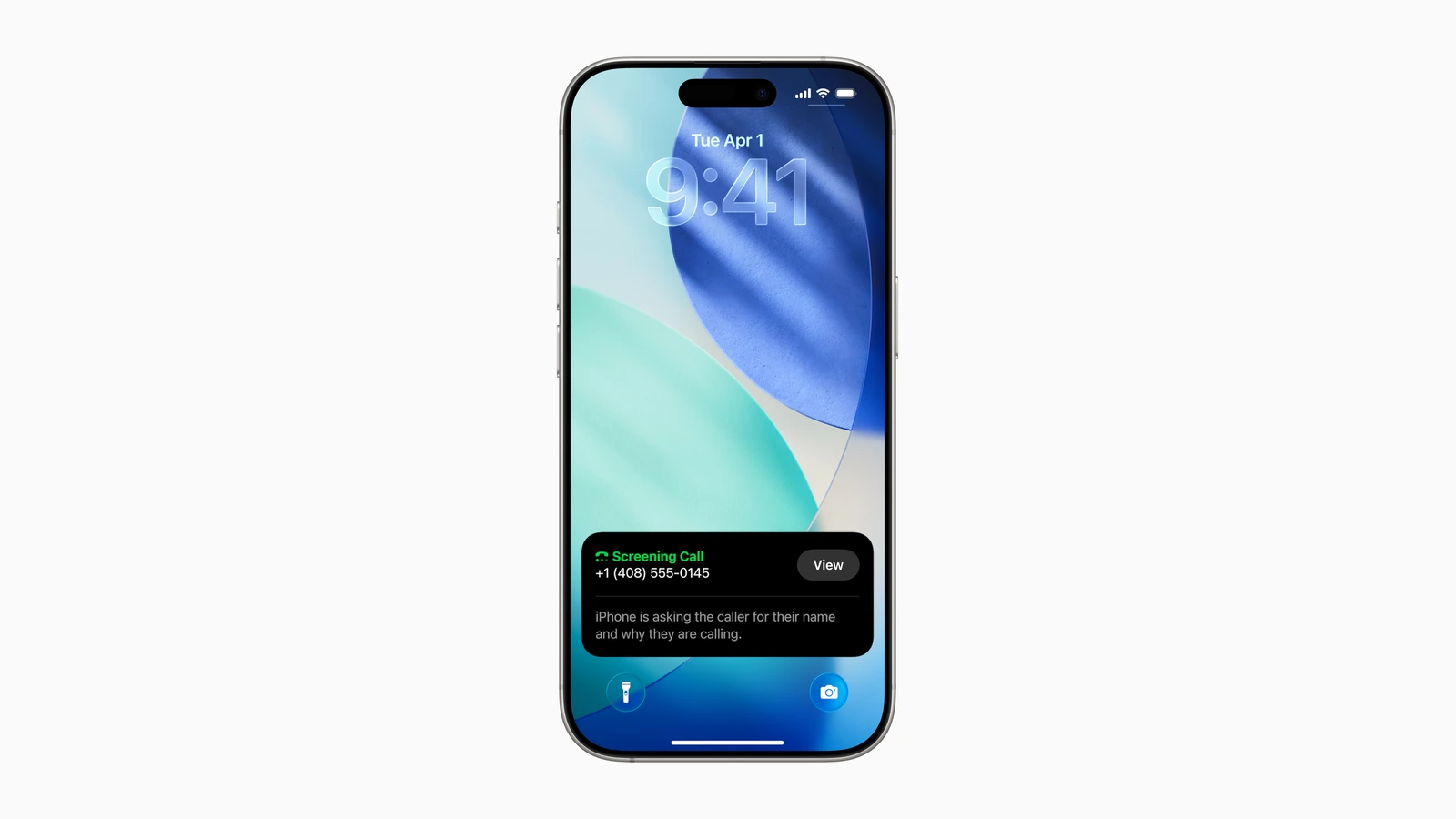
Apple says Call Screening answers calls from unknown numbers without interrupting you. After the caller gives a name and reason, your iPhone rings and shows the response so you can decide whether to pick up.
- Open Settings, tap Apps, then tap Phone.
- Choose one option:
- Never: Call Screening is off and the iPhone rings for unsaved numbers.
- Ask Reason for Calling: unknown numbers are asked for more information before the iPhone rings.
- Silence: calls from unsaved numbers are silenced, sent to voicemail and appear in Recents.
Filter unknown and spam calls
- Open Settings, tap Apps, then tap Phone.
- Turn on Unknown Callers: Apple says these calls leave Recents and go to the Unknown Callers list.
- Turn on Spam: Apple says calls your carrier identifies as potential spam or fraud are silenced, sent to voicemail and moved to the Spam list.
To review them, open the Phone app, tap Calls (unified layout) or Recents (classic layout), tap the filter icon, then tap Unknown Callers or Spam. To let a number through, tap Mark as Known next to the call in the Unknown Callers list.
FaceTime has its own switches. Apple's FaceTime guide puts Silence Unknown Callers, Unknown Callers and FaceTime Spam under Settings > Apps > FaceTime.
Turn on Live Voicemail
Apple says Live Voicemail shows a real-time transcription as someone leaves a message, and you can pick up while they talk.
- Open Settings, tap Apps, then tap Phone.
- Turn on Live Voicemail.
Apple says Live Voicemail is available from select carriers in select countries or regions, and that with Silence Unknown Callers on, unknown numbers go straight to it without ringing. Calls your carrier identifies as spam are instantly declined instead.
Turn on call identification
Apple says iPhone can identify callers using Apple Business Connect, supported carriers and supported call identification apps.
- Open Settings, tap Apps, then tap Phone.
- Tap Call Blocking & Identification.
- Turn on Business Call Identification, Call Identification apps, or both.
Business Call Identification uses Apple Business Connect or your carrier. Call Identification apps uses supported caller ID apps you have installed.
Block a number
Apple's guide gives this path:
- Open the Phone app.
- Tap Contacts, tap the contact, then tap Block Contact.
You can also go to Settings > Privacy & Security > Blocked Contacts, tap Add Blocked Contact and select a contact, per Apple. Apple says blocking applies in Phone, Messages and FaceTime.
To undo it, open Settings > Apps > Phone > Blocked Contacts, tap Edit, tap the minus icon, then tap Unblock.
Carrier filters
Apple's Spam switch relies on your carrier, and the FTC says carrier services vary: some are free and others charge a fee. Check your provider's website or customer service. The T-Mobile and AT&T carrier pages were not reachable when we checked, so their details below come from the carriers' own App Store listings, as of Oct. 27, 2026.
Verizon's Call Filter FAQs list two tiers:
| Tier | What Verizon lists | Cost |
|---|---|---|
| Call Filter | Spam Detection, Spam Filter, spam and blocked call log, allowed numbers, Report spam | Free for Verizon customers with a compatible device |
| Call Filter Plus | Adds Caller ID, Spam lookup, Personal block list, Block by category | $3.99/month |
Per Verizon's iPhone setup page, download the Verizon Call Filter app from the App Store, allow Notifications and Contacts, then tap Go to Settings, which opens iOS Call Blocking & Identification, and turn the toggle on.
T-Mobile Scam Shield
The T-Mobile Scam Shield app is free. The listing says these features are free for all T-Mobile customers; premium features are paid, and the listing gives no price.
| Tier | What the listing names |
|---|---|
| Free | Scam ID, Scam Block, Scam Reporting, Caller ID, Allow list |
| Premium (paid) | Personal Number Blocking, Category Manager (telemarketers, surveys), Reverse Number Lookup, Voicemail to Text |
To turn it on, open the Scam Shield app and switch on Scam Block and Caller ID. The listing says Scam Block lets T-Mobile's network automatically block calls from likely scammers when you turn it on. It also warns Scam Block might block calls you want, and you can disable it any time.
T-Mobile's T-Life app also lists Scam Shield protection, so the controls are in the Scam Shield app or T-Life.
AT&T ActiveArmor
The AT&T ActiveArmor app is free for AT&T wireless customers, and the listing says you must download it. The listing points to att.com/activearmorapp.
| Tier | What the listing names | Cost |
|---|---|---|
| Free | Auto Fraud Call Blocking, Spam Call Blocking, Call Routing Settings, My Block List, My Contacts, Caller ID, Device Security Alerts, Data Breach Alerts | Free |
| Advanced Mobile Security | Adds Reverse Number Lookup, Public Wi-Fi Protection (VPN), Safe Browsing, $1M identity theft insurance, credit and identity monitoring, Password Manager | $7/month per line, auto-renews |
To cancel Advanced Mobile Security, use ActiveArmor Settings > Change subscription, the AT&T app's Active add-ons, or iPhone Settings > your name > Subscriptions. The listing says the free features stay after you cancel.
Register with the FTC and report calls
The FTC says to register at DoNotCall.gov or call 1-888-382-1222 (TTY: 1-866-290-4236) from the phone you want to register. Registration never expires, and the FTC says it can take up to 31 days for sales calls to stop.
The FTC also says being on the Registry won't stop scammers from making illegal calls. The Registry is a list of numbers that registered telemarketers should not call, so it does not block calls itself.
Reporting depends on whether you lost money:
- No money lost: report the call at DoNotCall.gov.
- Money lost, or you have details on the caller: report at ReportFraud.ftc.gov.
More iPhone steps
Our guide to setting up passkeys on iPhone and Android covers signing in to accounts without passwords. How to clear System Data on iPhone covers another Settings cleanup.